OpenClaw + Codex/ClaudeCode Agent Swarm: The One-Person Dev Team
OpenClaw + Codex/ClaudeCode Agent Swarm: The One-Person Dev Team [Full Setup]
来源:https://x.com/elvissun/status/2025920521871716562 作者:Elvis (@elvissun) 发布时间:2026-02-23 数据:👍 10,127 | 🔁 1,513 | 👁 3,919,563 转载声明:本文转载自 X,原作者 @elvissun,版权归原作者所有。
I don't use Codex or Claude Code directly anymore.
I use OpenClaw as my orchestration layer. My orchestrator, Zoe, spawns the agents, writes their prompts, picks the right model for each task, monitors progress, and pings me on Telegram when PRs are ready to merge.
Proof points from the last 4 weeks:
- 94 commits in one day. My most productive day - I had 3 client calls and didn't open my editor once. The average is around 50 commits a day.
- 7 PRs in 30 minutes. Idea to production are blazing fast because coding and validations are mostly automated.
- Commits → MRR: I use this for a real B2B SaaS I'm building — bundling it with founder-led sales to deliver most feature requests same-day. Speed converts leads into paying customers.
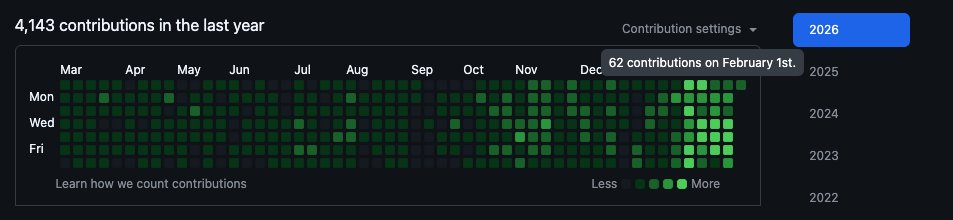
My git history looks like I just hired a dev team. In reality it's just me going from managing claude code, to managing an openclaw agent that manages a fleet of other claude code and codex agents.
Success rate: The system one-shots almost all small to medium tasks without any intervention.
Cost: ~$100/month for Claude and $90/month for Codex, but you can start with $20.
Why One AI Can't Do Both
Context windows are zero-sum. You have to choose what goes in.
Fill it with code → no room for business context. Fill it with customer history → no room for the codebase. This is why the two-tier system works: each AI is loaded with exactly what it needs.
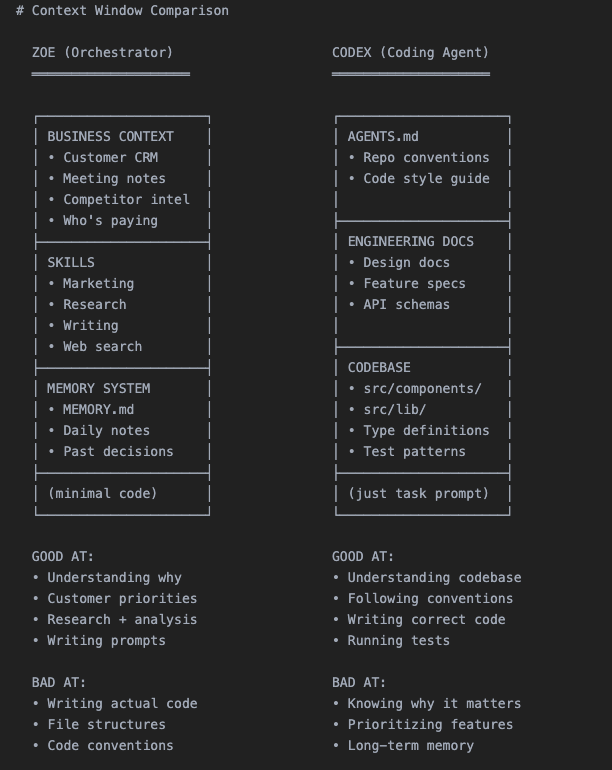
Specialization through context, not through different models.
The Full 8-step Workflow
Here's how the system works at a high level:
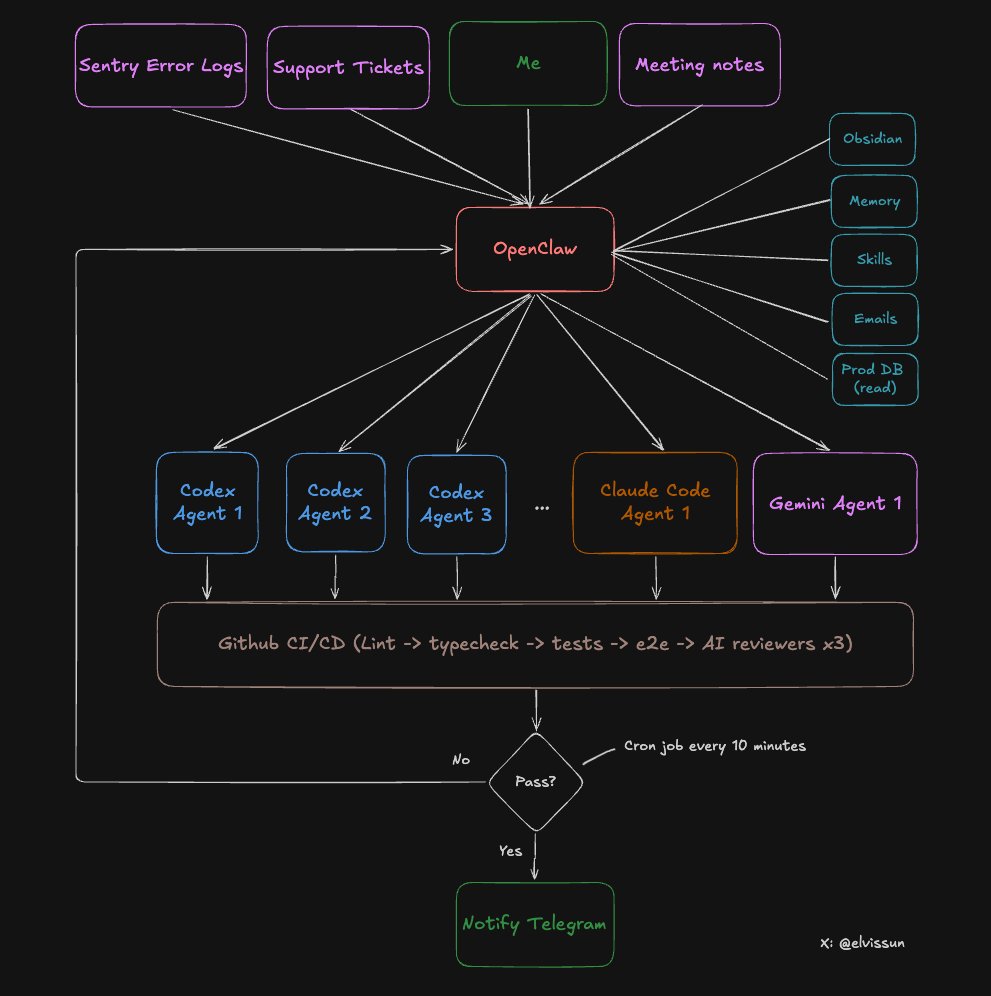
Step 1: Customer Request → Scoping with Zoe
After a customer call, I talked through the request with Zoe. Because all my meeting notes sync automatically to my Obsidian vault, zero explanation was needed. Then Zoe does three things:
- Tops up credits to unblock customer immediately — she has admin API access
- Pulls customer config from prod database — read-only prod DB access to retrieve their existing setup
- Spawns a Codex agent — with a detailed prompt containing all the context
Step 2: Spawn the Agent
Each agent gets its own worktree (isolated branch) and tmux session:
# Create worktree + spawn agent
git worktree add ../feat-custom-templates -b feat/custom-templates origin/main
cd ../feat-custom-templates && pnpm install
tmux new-session -d -s "codex-templates" \
  -c "/path/to/worktrees/feat-custom-templates" \
  "$HOME/.codex-agent/run-agent.sh templates gpt-5.3-codex high"
# Codex
codex --model gpt-5.3-codex \
  -c "model_reasoning_effort=high" \
  --dangerously-bypass-approvals-and-sandbox \
  "Your prompt here"

# Claude Code
claude --model claude-opus-4.5 \
  --dangerously-skip-permissions \
  -p "Your prompt here"
tmux is far better because mid-task redirection is powerful:
# Wrong approach:
tmux send-keys -t codex-templates "Stop. Focus on the API layer first, not the UI." Enter

# Needs more context:
tmux send-keys -t codex-templates "The schema is in src/types/template.ts. Use that." Enter
The task gets tracked in .clawdbot/active-tasks.json:
{
  "id": "feat-custom-templates",
  "tmuxSession": "codex-templates",
  "agent": "codex",
  "status": "running",
  "notifyOnComplete": true
}
Step 3: Monitoring in a Loop
A cron job runs every 10 minutes. It reads the JSON registry and checks:
- Checks if tmux sessions are alive
- Checks for open PRs on tracked branches
- Checks CI status via
ghcli - Auto-respawns failed agents (max 3 attempts)
- Only alerts if something needs human attention
I'm not watching terminals. The system tells me when to look.
Step 4: Agent Creates PR
The agent commits, pushes, and opens a PR via gh pr create --fill. Definition of done:
- PR created + branch synced to main
- CI passing (lint, types, unit tests, E2E)
- Codex review passed
- Claude Code review passed
- Gemini review passed
- Screenshots included (if UI changes)
Step 5: Automated Code Review
Every PR gets reviewed by three AI models:
- Codex Reviewer — Exceptional at edge cases, logic errors, race conditions. False positive rate is very low.
- Gemini Code Assist — Free, catches security issues and scalability problems. No brainer to install.
- Claude Code Reviewer — Tends to be overly cautious. I skip everything unless marked critical.
Step 6: Automated Testing
CI pipeline: Lint + TypeScript → Unit tests → E2E tests → Playwright against preview environment.
New rule: if the PR changes any UI, it must include a screenshot. Otherwise CI fails.
Step 7: Human Review
Now I get the Telegram notification: "PR #341 ready for review."
My review takes 5-10 minutes. Many PRs I merge without reading the code — the screenshot shows me everything I need.
Step 8: Merge
PR merges. A daily cron job cleans up orphaned worktrees and task registry json.
The Ralph Loop V2
When an agent fails, Zoe doesn't just respawn it with the same prompt. She looks at the failure with full business context:
- Agent ran out of context? "Focus only on these three files."
- Agent went the wrong direction? "Stop. The customer wanted X, not Y."
- Agent need clarification? "Here's customer's email and what their company does."
Zoe also finds work proactively:
- Morning: Scans Sentry → finds 4 new errors → spawns 4 agents to fix
- After meetings: Scans meeting notes → spawns agents for feature requests
- Evening: Scans git log → spawns Claude Code to update changelog and docs
Choosing the Right Agent
- Codex — Workhorse. Backend logic, complex bugs, multi-file refactors. 90% of tasks.
- Claude Code — Faster, better at frontend and git operations.
- Gemini — Design sensibility. Generate HTML/CSS spec first, then Claude Code implements it.
How to Set This Up
Copy this entire article into OpenClaw and tell it: "Implement this agent swarm setup for my codebase."
It'll read the architecture, create the scripts, set up the directory structure, and configure cron monitoring. Done in 10 minutes.
The Bottleneck Nobody Expects
RAM. Each agent needs its own worktree + node_modules. My Mac Mini with 16GB tops out at 4-5 agents before swapping. I bought a Mac Studio M4 Max with 128GB RAM ($3,500) to power this system.
原文链接:https://x.com/elvissun/status/2025920521871716562 | 转载自 @elvissun